Vehware Spring 2017 --- Ali Arda Eker
1/23/2017
- I talked with the Prof. Yin about our future goals for the eye tracking project.
- We covered his expectations from my software by the end of the term and we discussed how we can improve the current
situation of the program.
- Prof. Yin suggested some post processing methods which can refine my software such as Kalman Filter.
- Currently my program calculates the central point of the boxes that surround the eyes within the face found. What I will be
developing next is calculating the location of the irises within the eye boxes found. By that way the software will be more
accurate and sharp in terms of tracking the user`s eye as where he or she looks at.
- I could not have a chance to talk with the Bill who is the CEO of Vehware since my CPT is not generated yet.
1/30/2017
- I got my CPT and we arranged a meeting with Bill, Peng and Prof. Yin at ITC to talk about the current situation of the
project and our future goals.
- As Prof. Yin asked me to do last week I search the Kalman Filter on the web. It is basically an algorithm that can make a
smart guess using a combination of information in the presence. For example it can be used to locate a car. The algorithm can
combine the car's GPS that is accurate about 50 meters with the car's speed and generate a more precise location than the GPS.
The problem is, in my situation, the information in the presence is only the box that encapsulates the eye region. It is known
that the irises are in the center of those boxes but we need one more information to combine with to generate a more accurate
location of the irises. Thus I believe Kalman Filter is not applicable to my problem.
2/6/2017
- I talked with the Prof. Yin about Kalman Filter again. He said I can use it to reduce the noise in pre-processing in order to
produce more accurate results. But he also added it is not mandatory. He suggested that I can search for machine learning algorithms.
- As I searched the web for a machine learning algorithm that I can use for iris tracking, I found a paper written by Fabian Timm
that details an algorithm which fits all of my criteria. It uses image gradients and dot products to create a function that
theoretically is at a maximum at the center of the image’s most prominent circle. I think I will implement this for my problem. I
even found some examples on GitHub which demonstrate how this algorithm works.
- I also met with Prof. Yin's pHd student Peng and CEO of the Vehware Mr. Howe at the ITC. We talked about how eye tracking
software will be integrated with the rest of the wheel-chair project and how the software and hardware parts will be communicating.
2/13/2017
- As I studied the Fabian Timm`s article I discovered some constraints. First of all the program should work on low resolution images.
I don`t know why particularly this is like that since I don`t know the paper with every detail yet. But as I review image
processing forums and read what other programmers say this is what I see. It is not a big deal for me because I am getting images
using laptop`s webcam and they are not so high resolution anyway. But I can reduce the resolution if needed using techniques I have
learned last term in image processing class of Prof. Yin. I can implement DCT based image compression, image scaling or nearest-neighbor
interpolation. I can use functions from OpenCV library to reduce resolution too and this saves me time and effort but it can be hard to
customize them to adopt my problem.
- Second constraint is the program must be able to run in real-time. Again I am not pretty sure why it is like that since I didn't know the
Fabian Timm`s article in detail but this is what I see on the forums so far. This constraint is not as important as the first one because my
program uses laptop`s webcam which is real-time anyway.
- Another thing is my program should be accurate enough to track where user looks at but I will leave this for the end because I need to
implement the program first and see how it runs. After that I will test it with various backgrounds and obstacles.
2/20/2017
- This week I have read the article by Fabian Timm and Erhardt Barth which proposes the approach I am considering to implement for eye
tracking. Its name is Accurate Eye Centre Localization By Means Of Gradients and it proposes a method to find eye centers using image
gradients. The method implements a mathematical function which is consist of dot products. The maximum of this function will correspond
to the location where most gradient vectors intersect and it will be the eye’s centre according to the paper. I will take benefit from
OpenCV library to build this method.
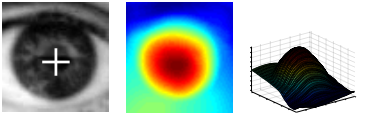
- The mathematical function that I mentioned above will achieve a strong maximum at the centre of the pupil. We can see the 2-dimensional
plot at the centre and 3-dimensional plot at the right which resembles this maximum point. And at the center the output of the function is
shown with a white marked at the pupil.

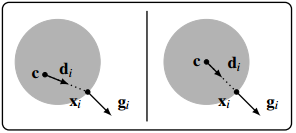
- An example with a dark circle on a light background which is like the iris and the sclera is shown below. On the left the displacement
vector di and the gradient vector gi do not have the same orientation thus we can say that di is not at the centre yet. But on the right
we can see that orientations of di and gi match which means we got di at the centre.

2/27/2017
- First of all we arranged a meeting at ITC for next Wednesday. I will meet with Bill and capstone team there to discuss the current situation
of the project and we will demonstrate what we have developed so far.
- My program had some bugs as I mentioned and explained them in the last term's presentation and report. The program were drawing false positive
rectangles for both eyes and faces. I revised my program and now it works almost as expected. I managed to reduce the number of false positives to
0. That means face detection program detects always faces and eyes but now it produces some false negative results. That means up to a certain
degree it is not able to catch a face or eye. False negatives are always better than false positives so I count that as a improvement. Because taking
a face shape figure as a face could threat the rest of the system worse than forgetting to catch a face at all.
- Now, I will explain how I revised the program. First of all I categorized the error types. Most common one was that, program were drawing face
rectangles on face like objects with a certain ration. This was the biggest issue but as I getting this false result all the time I realized that
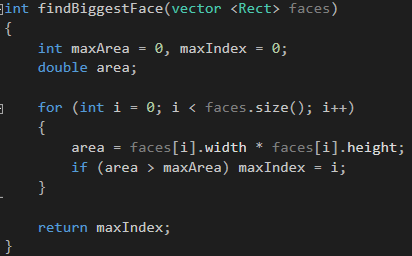
the false positives it drew were always smaller than the true positive. After I figured this out it was easy to fix it. I simply wrote a function
which finds the index of the face rectangle with maximum area as shown below.

- And second most common error type I realized was that, I was getting a third eye box which is usually at the corner of my mouth or nostril that can
be regarded as eyes by the program. It was also easy to fix after I realized the common ground of these false positives. Firstly I didn't let the
program to draw more then 2 eyes at a time. Then, I put a condition which checks if the location of the eye center is lower than the location of the
center of the face rectangle. This means I discarded the eye rectangles at the lower part of the face rectangle using the the condition below.


3/06/2017
- I have met with Bill at ITC who is the CEO of the VehWare this week. I demonstrated him what I have developed so far and he seemed very satisfied.
I told him the face and eye detection accuracy of the software is improved significantly but it is still having difficulties if the person is wearing
a glasses or if there are two people on the vision at the same time. If the external conditions are optimum program produces fine results.
- Me and Bill also said that we should meet every week from now on because the approaching deadline. Thus we are meeting at ITC every Wednesday to
talk about the current situation of the project. We also agreed that I do not need to meet with Prof. Yin any more since I am discussing the details
with Bill now. So I am working directly for Bill and Vehware from now on. I will not meet with Prof. Yin or his pHd student Peng.
- I had a meeting with Prof. Jones to talk about the current situation of the project. We talked about what I did so far and I told him that I will not
meet with Prof. Yin and his pHd student any more. Instead I will meet with Bill every week and I will directly work for VehWare from now on.
3/13/2017
- We had a meeting this Wednesday at ITC to discuss about the details of my software but it is cancelled due to Stella. We will be meeting next
Wednesday and I am going to do another demonstration to Bill. I added some improvements to my current software as Bill suggested.
- My program was tracking eye region centers instead of pupils. As Bill requested I designed it again using Fabian Timm's algorithm and now it tracks
pupils. I was going to demonstrate it this Wednesday to Bill but since the heavy snow storm, we postponed it to the next Wednesday.
- Now, program detects pupils using the algorithm told in Fabian Timm's article. I found some examples on the web which uses that algorithm and I
benefited from them. Program now tracks the pupils which means it can track where the user looks at without needing user to move his head. So, if
user holds his head and even his eye regions still, program can detect where he or she looks just by reading his or her pupil movements as shown below.
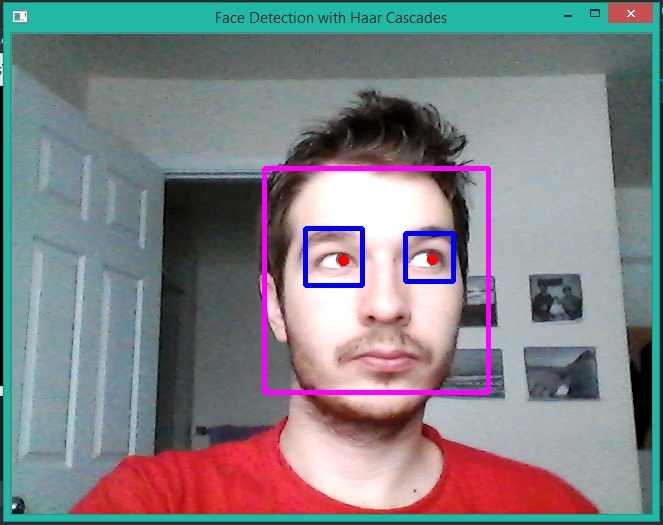

- As you can see above, red dots are not in the center anymore. Before, they were drew just in the center of eye regions, assuming pupils are located
there. But now they literally track user's pupils. I should mention this though, this software is not tracking user's pupils in every frame which
camera captures. Due to complexity of the program, it can be confused time to time. So, in fact, I had a hard time capturing the above image. But as you
can see red dots are not in the center which means program literally captured where I looked at.
- As I improved the program to track pupil movements instead of eye region centers, I lost some accuracy. Before it was capturing eye centers with a
a higher rate comparing to the capturing rate of pupils since this is algorithmically much more complex. My next goal is improving this capturing rate.
- Last week, Bill told me to implement pupil tracking feature and then start coding a blinking rate calculating software. I implemented pupil tracker
now and I hope I will start blinking calculator software soon. But first I should demonstrate this to Bill and improve its accuracy if Bill says so.
I implement each component which is prioritized by Bill.
3/20/2017
- This week I have met with Bill to demonstrate the pupil tracker. I run the program using his face and my face as input, with glasses and without glasses
and he has a beard which I don`t. Under all those variables, I realized program is unable to track pupils with glasses. It is also dependent on the eye
region size of the person. I am always told that I have small eyes, so program is tracking Bill`s who has a moderate eye size better although his beard
- Although the performance decline of the program after I added pupil tracking feature, and dependency of the external conditions, software is doing
not a bad job in overall. Thus Bill and I agreed, from now on, I will work on a new feature which will be the blinking rate calculator. I will work on implementing
that at the following weeks. And then I will do another demonstration with the new feature to the Bill.
- I am considering to calculate the blinking rate based on the number of frames with eye regions detected and pupils captured. This is just in theory but
I think the rate will be number of frames with correctly detected pupils over all of the valid frames captured with a face in them. Thus I am using my pupil
tacker feature to implement the blinking rate feature so all of these components will be built on top of the program I presented at the end of last term
- I also realized pupil tracker is working best if the user looks at right or left. As he or she looks further right or left, program detects the pupils with a
higher certainty as expected. But if you look at top, it is harder for the program detect the pupils and it draws the red dots which indicate the pupil location
slightly above the actual pupil positions. The worst case scenario is, if the user looks down, program just looses the eyes. When you look down, it is seen as
you closed your eyes (It is like that on my face) so it is expected for the program to have difficulty on tracking that. I will work on those flaws more on the
following weeks.
3/27/2017
- This week I have met with Bill and Capstone team again. Peng was supposed to be there but he did not show up. After Capstone team demonstrated the current
situation of the components they were working on which is the hardware part of the wheelchair project, we talked about the software part which is the eye tracking
feature of the wheelchair. As Capstone team told Peng was not very responsive, we agreed that I will work more closely with Capstone team in order to help them
develop and integrate eye tracking software with the hardware components of the wheelchair. Thus Bill and I agreed that I will leave the blinking calculator software
at the end and start working on the eye tracking feature of the wheelchair.
- Currently I have the eye tracking program ready and working with moderate accuracy. What I need to do next is integration of this program with what Capstone team
developed so far. I will improve the software to enable its communication with Arduino UNO that Capstone team using to move the wheelchair. To accomplish this I will
calculate the angle which is between where user look horizontally and where is user`s head is facing. We are assuming he or she will not move head, they just move their
pupils. Integrating head motion will be next part. We started from the basic.
- After calculating the angle I will select which section it falls into as shown below. This design is made by the Capstone team last term in order to find a way to communicate
wheelchair with the eye tracking component. Capstone team needs the data which will be sent from my program in a text field with a format they specified. So after
calculating the section user`s look falls into I will send it to Capstone`s Arduino in a .txt file.

4/03/2017
- This Wednesday we have met with the Bill, Peng and Capstone team as usual. We talked about the current situation of the project and what we developed so far.
Capstone team said they are almost done with their components. So they need the eye tracking software from me and Peng to test it with the wheel chair in order to
see if it works correctly with actual data generated by the eye tracking program.
- We have met with the same group at Friday too. We went to the lab and tried to move the wheel chair as shown below with the Peng`s program. Peng`s software failed
so again we did not have the chance to test it with real data. Instead we tested the wheelchair with the joystick. Joystick interface was having some problems too but we
figured out that it was because of lousy cable connections so it moved as expected.


- I should talk about the design of the wheelchair. The movement direction is generated by two input sources, either the eye tracker software or joystick. It is deigned like
this because paralyzed people who can`t use their hands or partially paralyzed people who could use their hands are targeted. Arduino which runs the whole components
together takes input from those sources and communicates with the motor. It has a C program in it that converts the data coming from sources to the data which the motor
could understand and send them to it. Since I am not responsible of the hardware part of the project I don`t know those in detail but I will talk about the data my eye tracker
software should send to the Arduino in the next paragraph.

- The Arduino is expecting a string from the eye tracking software. If the detection of pupils succeeded the string should be sent will be in this format:
"+a1a2+b1b2+c1c2$"
- Here a1 and a2 indicate a 2 digit number which is the angle of user looks at horizontally. The + sign in front of them means that user is looking at right. We take the forward as 0
and calculate the angle user is looking between -45 and +45. So in order to make a sharp left turn program sends an angle between -45 and -30, to make a soft left turn -30 and -15
to go forward -15 and 15, to make a soft right turn 15 and 30 and to make a sharp right turn 30 and 45.
- The b1 and b2 indicate again indicate 2 digit number which user looks at vertically. We did not set the range yet because our first goal is to move the wheel chair right or left. Later,
it will be used to speed up the wheelchair if the number is above 0 or to slow it down if it is negative. The origin is 0 again towards forward.
- The c1 and c2 is the last 2 digit number to indicate the tilt. It will be generated if user tilts his or her head to the right or left. We are not dealing with this right now since it is not crucial
but we will do it after we are done with first two angles. And the $ sign at the end indicates software is sending a data with captured eye movements and Arduino is expecting it to be at the
It also expect a 10 digit string which is composed of 3 angles and a $ sign to indicate a successful detection of eye movements. Then it does the parsing and conversion from string to integer.
"-23+12+00$" is an example of successful detection.
- We have 3 different error messages. The first one shown below indicates that the face is not detected. Second one is for undetected eye regions and the third one is for loosing of pupil
movements. We separated them to debug the wheelchair and software easily.
"###$"
"!!!$"
"***$"
- Currently, the laptop which is connected to the camera mounted at the in front of the user and executing the eye tracking software is supposed to be carried with the wheelchair itself.
But since this is not very handy, we would like to use a Raspberry Pi. The openCV and other necessary libraries should be installed into it with the Linux OS and connected to the between
camera and Arduino.
4/10/2017
- Spring break.
4/17/2017
- This week I had not have the chance to do much. Monday was a off day and since I still have time to finish eye tracker software I am taking it easy.
The project is due 5th of May so I am planing to complete my components by next Wednesday to show them to Bill. So I would have time to test it and
do a demo to the rest of the project team by Friday in the laboratory like we did previous week.
- We had a meeting at Wednesday as usual. Me, Peng, Bill and the Capstone team discussed about the current situation of the project and planned how
we can complete the wheel chair with all of its components by the 5th of May.
4/24/2017
- This week, we again had a meeting at ITC. I did a demo to Bill last version of my eye tracking software. It now tracks the pupil location and using the central
point of the eye boxes calculates where user looks. Below red dot represents where the pupil is and the green dot is central point. Then the output is
printed on the screen with the format I talked before.

- As you can see above, when user looks at right red dots follow it and using the difference between red dot and green dot which is the original
position, I calculate the distance travelled in x and y direction. First two integers of the output mean that. Last one is for tilting but we did not
plan to develop it for this year.
- The values to be printed are 0, 20 or 40 either positive or negative. As you can see on the terminal when I looked right the positive 20 is printed
which tells the wheelchair to make a soft right turn. 0 means going forward and 40 means a shar turn. For the second integer if it is 20 wheelchair
increases its speed with a certain degree. If it is 40 it speeds up more. Negative results make it slow down. Also the ### signal is printed to tell
if both eyes not captured. It is not there in this example but if !!! is printed it would mean the face is not captured at all. The $ at the end just
for the Arduino code to parse the incoming signal.
- Software has some bugs. It sometimes misses one of the eyes or the whole face. Also it can miscalculate the location of the pupils. But generally it
works fine. Only thing is once in a while I got blue screen error which says video scheduler error. I searched this error on the web for a while. Some
says it is because of a virus on my pc but I don't believe that. I think I put too much on my cpu and display card so I should reinstall the display
drivers. Also I could solve this problem by not drawing every shape I constructed on the screen. I do that for user to understand what is going on but
printing face and eye boxes with pupil and central point dots at the same time also delay my output printing.
- There are some think I will change next. First of all program right now uses the pc's camera. The camera is not good so algorithm has hard time
processing it so instead of using its own camera I will change the code to connect the algorithm to an external camera. It is also crucial for
this software to work on a wheelchair.
- Another thing is I now print the direction signal on the terminal to test it I will change it to print on the usb port of the pc which communicates
with the Arduino.
- Also to adjust the software and get better results my angle thresholds need more testing. Right now it works but as I said sometimes I calculates the
angles faulty so this will be the next thing I should do.
5/01/2017
- Project is officially done. I have made a presentation and demo to Bill ana Prof. Jones about what I have accomplished so far in this term.
- Wheelchair with final components added are shown to stakeholders. Capstone team made their presentation too.
- Next week I am going to meet with Bill at ITC to learn more about the hardware parts of the wheelchair because I am going to connect my
eye tracker software to the wheelchair and show Prof. Jone how it runs with my code in it during summer.
- I also send the eye tacker software package to Prof. Jones with instructions for how to run it in any other computer.
5/08/2017
