Shopping Festival: Difference between revisions
| (56 intermediate revisions by the same user not shown) | |||
| Line 54: | Line 54: | ||
=== Cascade and Restrict === |
=== Cascade and Restrict === |
||
In this database we use cascade option on updates and deletes because the database need to update the refencing table. For example, when we update the OptionID:1 OptionGroupID:1 OpitonName: Red to OptionID:2 OptionGroupID:1 OpitonName: Red and it will update all OptionID:1 to OptionID:2 in productoptions table and that product will be red. |
In this database we use cascade option on updates and deletes because the database need to update the refencing table. For example, when we update the OptionID:1 OptionGroupID:1 OpitonName: Red to OptionID:2 OptionGroupID:1 OpitonName: Red and it will update all OptionID:1 to OptionID:2 in productoptions table and that product will be red. |
||
== Web Programming == |
|||
===Program Flow === |
|||
Our program starts with index.jsp file this file is a homepage. In our homepage there is navigation bar, search field, and login form. You can navigate between cloth sections without login but when you are in guest mode you cant buy anything from catalogs. There is no buy button in guest mode. But you can still search in database and visit catalogs. Besides from all this there is a home button for return to index.jsp our home page. |
|||
Our navigation bar consist buttons dropdown menus and text fields. In dropdown menus there are categories, which we gather from our database dynamically. Text field is for our search operations and search button is a submit button for the text field. |
|||
Home page consists a login form, which helps guest to login. Our login form you can type your user name and password, or you can go to registiration area. Lets first talk about registiration area. When guest click the registiration button, this button redirect guest to reg.jsp which holds a form for our guest to enter information. In this jsp there are couple place to fill these are; |
|||
(*) Must filled |
|||
*First Name(*) |
|||
*Last Name(*) |
|||
*Email(*) |
|||
*Password(*) |
|||
*City |
|||
*State |
|||
*ZIP |
|||
*Phone |
|||
*Country |
|||
*Address(*) |
|||
*Address2 |
|||
There are couple validations for this form. First one password length can't be longer than 15. The other validation is you can't submit empty the ones with marks. Our program is checking these filleds strings with isEmpty() function. This function returns true if the string is empty. Last validation is more complicated one. In this validation we control if the email is valid or not. |
|||
After submit this form redirects to registiration.jsp. In this jsp we insert the guest information to our database.We get inputs we a single function.We did this for every input and keep these inputs in different string variables. After this we build a connection with our database. Write address of our database, name of database, username and password in a connection function. After established the connection there are couple if and elses for validation, if the inputs are wrong then they will give error and expect them to try again. If the all inputs are correct than the insert to database part comes. |
|||
If a guest wants to login. It needs to fill the login form in index.jsp. In this form guest needs to fill both username and password areas. If they don't then program will give error and want them to try again. If they succesfully enter information they will redirect to login.jsp. This jsp basically same with registiration. We establish a connection with database get parameters from login form. If you are an admin then you will redirect to admin.jsp, or if you are a user, you will redirect to user.jsp. |
|||
==== Admin Options ==== |
|||
*'''Add Product''': In this section we get needed information from admin, like; product name, product price, stock... After submit, program will redirect admin to Addproduct.jsp. |
|||
*'''Delete Product''': In this section we get the product name that wanted to delete. With just with this name we try to delete the product if the delete is succesfull, admin will redirect to the admin.jsp, if there is an error system will print error. |
|||
*'''Add Category''' |
|||
*'''Delete Category''' |
|||
*'''Add User''' |
|||
*'''Delete User''' |
|||
Delete Category, add category, add user and delete user doing the different things with almost same operations with Delete Product. |
|||
== Mobile Programming == |
== Mobile Programming == |
||
There is Android and IOS mobile applications of the website. For Android, java language is written in eclipse and for ios objective C is the language. The mobile versions are working similar, although there is no Admin page for the mobile apps, admins can only reach the website from the original webpage. |
There is Android and IOS mobile applications of the website. For Android, java language is written in eclipse and for ios objective C is the language. The mobile versions are working similar, although there is no Admin page for the mobile apps, admins can only reach the website from the original webpage. |
||
=== IOS === |
|||
[[File:Example.jpg]] |
|||
=== Android === |
=== Android === |
||
==== Main Activity ==== |
==== Main Activity ==== |
||
Main activity has 3 buttons, so user can login, sign up or go to the products page by clicking guest page button. Each button will lead the user to the next related activity. |
Main activity has 3 buttons, so user can login, sign up or go to the products page by clicking guest page button. Each button will lead the user to the next related activity. |
||
[[File:Mainactivity.png]] |
|||
[[image:mainactivity1.jpg]] |
|||
==Weekly Advancement== |
|||
===[[image:sfscreen11.png]]=== |
|||
===[[image:sfscreen21.png]]=== |
|||
===Week 9=== |
|||
Android part of project has been started. Main page, and login GUI's has been completed and activities linked according to diagram. |
|||
[[image:login1.jpg]] |
|||
IOS laboratory was out of power. |
|||
Database connection to website has been established. The website can read and update data from database in real-time. |
|||
===Week 10=== |
|||
PHP files has been coded to establish connection between Android and WAMP Server. As above; |
|||
*'''Add Product |
|||
*'''Delete Product |
|||
*'''Add User |
|||
IOS part of project has been started. Main page, sign up, login GUI's has been completed and activities linked according to diagram. Building processes was not successful due to access level on workspace. |
|||
===Spring Break=== |
|||
===Week 12=== |
|||
Android database connection established to get data to console. Working on printing the information to the activity that we have created. PHP Files has been added to project as above; |
|||
*'''Update Product |
|||
*'''Update User |
|||
*'''Print Product |
|||
*'''Database Connect |
|||
*'''Database Configuration |
|||
IOS part of the project has been canceled due to access restriction on lab computers. |
|||
Shopping cart for website has been started by using Java Sessions. But the cart is able to hold only one item regardless of quantity. |
|||
===Week 13=== |
|||
Android database connection with activity page is established and the information is printed in on the screen. Guest activity has been created and started on working list all the products with product images, descriptions, and prices. |
|||
*Android guest products activity is done. |
|||
[[image:selectcat.jpg]] [[image:menguest.jpg]] [[image:userproducts.jpg]] |
|||
*If guest want to buy product there will be pop up message to remind guest to login. |
|||
[[image:guestbuy.jpg]] |
|||
Shopping cart for website is done. The receipt page and user account information updates has been started. |
|||
===Week 14=== |
|||
*Android cart and reciept activiis are done. |
|||
[[image:cart.jpg]] [[image:reciept.jpg]] |
|||
*Website part is completely done. |
|||
Cart Page |
|||
[[image:webcart.jpg]] |
|||
Reciept Page |
|||
[[image:webreciept.jpg]] |
|||
===Risk Management=== |
|||
[[image:risk.png ]] |
|||
==Team== |
|||
Team members are Berkan Musellim, Melis Tanriverdi, Kerem Yel, and Yasemin Bakir. |
|||
[[image:IMG_8860.jpg ]] |
|||
Latest revision as of 23:42, 10 May 2015
Introduction
Shopping Festival is an e-commerce website project for Information System Senior Project. The project’s aim is to create an E-Commerce website. It will use Java on server side and client side, and MySQL on database management. Shopping Festival provides a platform with various kinds of outfits as data. On Shopping Festival Website, guests can reach the products in stocks and information of the products, but they cannot shop due to authorization limitations because they are not user. In order to get authorization, guests are expected to login as a user and if they do not have an account, they will first register and then they should login as user. After user login, they can check items in store by categories which are mainly divided into two categories as women and men. And also if a user wants to, s/he can choose the type of outfit as t-shirt, dress, shoes, etc. once they have selected a gender. Since users have authorization to buy items, the user can select one or multiple items and buy them. In admin panel on website, the admin can add or delete items, users, products or product categories from database. Even if admin has wide range of database actions, there is no direct connection between webpage and database. In a nutshell, Shopping Festival carries almost all the features of today’s e-commerce websites. By finishing this project team members will have more experience in this field and this is the main purpose of the assignment.
Development and Operation Environment
Environment Platform
3 main environments;
- Java
- MySQL
- HTML
- JavaScript
- IOS
- Android
As a helping application, Apache Server TomCat will be used to establish connection between database and working environment. Necessary programs to run the projects are: Netbeans; which runs the Java Servlets and JSP files, WAMP Server; which runs PHP My Admin application to use database from localhost as server and a web browser which is an interface for user to browse the website, for Android part, we will use Eclipse as developing environment.For mobile applications Objective C and Java will be used.
Functions
- AddProductToStock : Adding existing product to stock
- AddProduct : New Product adding handler
- AddCategory : Category adding handler
- DeleteCategory : Product category deleting handler
- DeleteProduct : Product deleting handler
- DeleteUser : User deleting handler for admin
- AddUser : User adding handler for admin
- Logout : Logout handler for session ending
- Search : Search handler for users
- Registration : Registration page
Source Packages
- Main Servlet Admin : Main page servlet for admin
- Main Servlet Guest : Main page servlet for guest
- Main Servlet User : Main page servlet for user
- Shopping Cart : Shopping cart session handler for shopping cart
- Product : Product class for shopping cart
Database and Variables
Database ER Diagram

Database Variables
This database has 8 tables. These tables have their Primary and Foreign keys.
- Users table, there is one primary key which is UserID. It should be unique and primary because user can has only one id and all other properties are dependent on the UserID.
- Orders table, there is a primary key which is OrderID and also there is a foreign key,UserID, references to the user table. It should have this foreign key because the database should show the which user has which order.
- OrdersDetails table, there is a primary key which is DetailID and also there is two foreign keys; DetailOrderID, references to the orders table and DetailProductID, references to the products table to indicate that which product is ordered.
- ProductOptions table, there is a primary key which is ProductOptionID and also there is three foreign keys; ProductID references to the product table to get the product name and other properties, OptionID references options table to indicate the size or the colour of the product, and OptionGroupID references optiongroups table to indicate that the property of option is color, size or shoesize.
- Products table, there is a primary key which is ProductID and it is also a foreign key which references to the productoptions table to indicate the product properties.
- Productcategories table there is a primary key CategoryID which is also a foreign key and references to the products table to indicate the variety of the products, T-shirt, shirt, dress, shoe or something that the admin would add or change to categories.
- Options table, there is a primary key which is OptionID and it is also a foreign key and references to the productoptions table to indicate the options of the product.
- OptionGroups table, there is a primary key which is OptionGroupID and it is also a foreign key and references to the productoptiontable to indicate the option group of the options.
Cascade and Restrict
In this database we use cascade option on updates and deletes because the database need to update the refencing table. For example, when we update the OptionID:1 OptionGroupID:1 OpitonName: Red to OptionID:2 OptionGroupID:1 OpitonName: Red and it will update all OptionID:1 to OptionID:2 in productoptions table and that product will be red.
Web Programming
Program Flow
Our program starts with index.jsp file this file is a homepage. In our homepage there is navigation bar, search field, and login form. You can navigate between cloth sections without login but when you are in guest mode you cant buy anything from catalogs. There is no buy button in guest mode. But you can still search in database and visit catalogs. Besides from all this there is a home button for return to index.jsp our home page.
Our navigation bar consist buttons dropdown menus and text fields. In dropdown menus there are categories, which we gather from our database dynamically. Text field is for our search operations and search button is a submit button for the text field.
Home page consists a login form, which helps guest to login. Our login form you can type your user name and password, or you can go to registiration area. Lets first talk about registiration area. When guest click the registiration button, this button redirect guest to reg.jsp which holds a form for our guest to enter information. In this jsp there are couple place to fill these are;
    (*) Must filled
    *First Name(*)
    *Last Name(*)
    *Email(*)
    *Password(*)
    *City
    *State
    *ZIP
    *Phone
    *Country
    *Address(*)
    *Address2
There are couple validations for this form. First one password length can't be longer than 15. The other validation is you can't submit empty the ones with marks. Our program is checking these filleds strings with isEmpty() function. This function returns true if the string is empty. Last validation is more complicated one. In this validation we control if the email is valid or not.
After submit this form redirects to registiration.jsp. In this jsp we insert the guest information to our database.We get inputs we a single function.We did this for every input and keep these inputs in different string variables. After this we build a connection with our database. Write address of our database, name of database, username and password in a connection function. After established the connection there are couple if and elses for validation, if the inputs are wrong then they will give error and expect them to try again. If the all inputs are correct than the insert to database part comes.
If a guest wants to login. It needs to fill the login form in index.jsp. In this form guest needs to fill both username and password areas. If they don't then program will give error and want them to try again. If they succesfully enter information they will redirect to login.jsp. This jsp basically same with registiration. We establish a connection with database get parameters from login form. If you are an admin then you will redirect to admin.jsp, or if you are a user, you will redirect to user.jsp.
Admin Options
- Add Product: In this section we get needed information from admin, like; product name, product price, stock... After submit, program will redirect admin to Addproduct.jsp.
- Delete Product: In this section we get the product name that wanted to delete. With just with this name we try to delete the product if the delete is succesfull, admin will redirect to the admin.jsp, if there is an error system will print error.
- Add Category
- Delete Category
- Add User
- Delete User
Delete Category, add category, add user and delete user doing the different things with almost same operations with Delete Product.
Mobile Programming
There is Android and IOS mobile applications of the website. For Android, java language is written in eclipse and for ios objective C is the language. The mobile versions are working similar, although there is no Admin page for the mobile apps, admins can only reach the website from the original webpage.
Android
Main Activity
Main activity has 3 buttons, so user can login, sign up or go to the products page by clicking guest page button. Each button will lead the user to the next related activity.

Weekly Advancement


Week 9
Android part of project has been started. Main page, and login GUI's has been completed and activities linked according to diagram.

IOS laboratory was out of power.
Database connection to website has been established. The website can read and update data from database in real-time.
Week 10
PHP files has been coded to establish connection between Android and WAMP Server. As above;
- Add Product
- Delete Product
- Add User
IOS part of project has been started. Main page, sign up, login GUI's has been completed and activities linked according to diagram. Building processes was not successful due to access level on workspace.
Spring Break
Week 12
Android database connection established to get data to console. Working on printing the information to the activity that we have created. PHP Files has been added to project as above;
- Update Product
- Update User
- Print Product
- Database Connect
- Database Configuration
IOS part of the project has been canceled due to access restriction on lab computers.
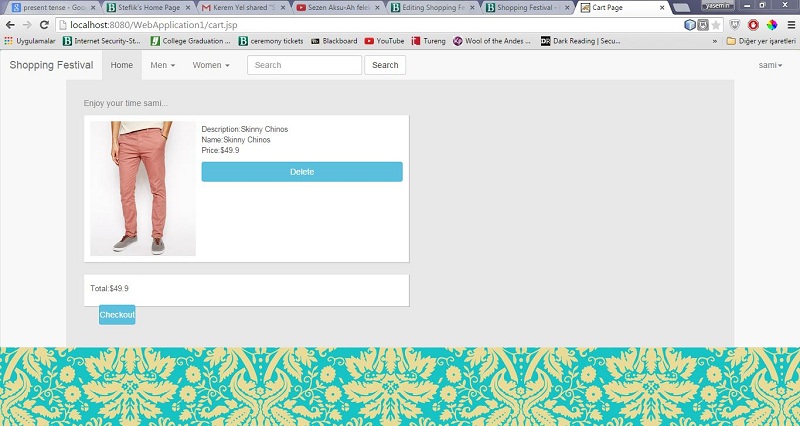
Shopping cart for website has been started by using Java Sessions. But the cart is able to hold only one item regardless of quantity.
Week 13
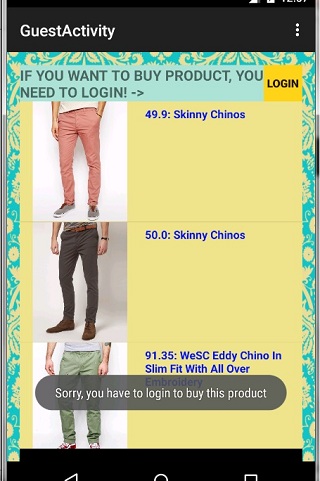
Android database connection with activity page is established and the information is printed in on the screen. Guest activity has been created and started on working list all the products with product images, descriptions, and prices.
- Android guest products activity is done.


- If guest want to buy product there will be pop up message to remind guest to login.

Shopping cart for website is done. The receipt page and user account information updates has been started.
Week 14
- Android cart and reciept activiis are done.


- Website part is completely done.
Cart Page

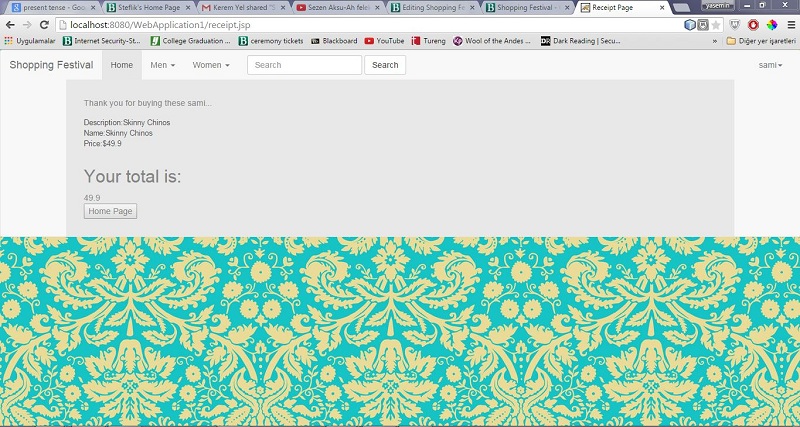
Reciept Page

Risk Management

Team
Team members are Berkan Musellim, Melis Tanriverdi, Kerem Yel, and Yasemin Bakir.

